Wednesday, 14 October 2009

SAP - Creating and Updating Vendor Master Records through SAP API

As an ERP, you would think that programatically creating a basic Vendor record in SAP would be one of the basic, easily accessible functions right?

WRONG! (Thunderclap ensues...)

When creating technical specifications for a vendor create function being called from SAP BPM, I tried to find how to programmatically create a Vendor. Unfortunately, this area is not well documented (like many areas of SAP) so I had to do the usual exhaustive/brute force search for the correct Function Module or Class Calls to make. This is what I found:

  1. There is a BAPI in SAP called "BAPI_VENDOR_CREATE" that I found through standard transaction /nbapi - however if you look at the definition it doesn't actually have any parameters. This effectively makes it useless. Obviously it is for internal use!

  2. The SAP Enterprise Service (BusinessPartnerDataManagementSupplierIn) is not comprehensive at all - it has a create, but not an update. Seems like quite an oversight to me... I am reluctant to use the enterprise service (which is the "Best Practice" Method of making updates to SAP) for the "Create Vendor" call, but another API set for the Update of that same Vendor. My search continues...
  3. Perhaps it is available as a Class, not a BAPI or Enterprise Service.... so I went to transaction /nse80 (Repository Browser) and did several exhaustive searches on SAP classes. I eventually found a few possible candidates - and nailed it down to the "Vendor Maintenance API" - VMD_EI_API, which has an "INITIALIZE" Method and a "MAINTENANCE" method which allows for the create and the update of vendors. Voila!

    Using the Repository Browser to nail down that Vendor Create API:

Found the needle in the proverbial haystack at the bottom of the search list (VMD_EI_API - the SAP Vendor Maintenance API):

Here is the model we used to call this from web services (done via SAP PI to simplify mapping):


UPDATE (14 Oct 2009) : Obviously other people have been having the same issue trying to find the API - as per my post on the SAP Developer Network (SDN) - https://forumsa.sdn.sap.com/thread.jspa?messageID=8283585#8283585


SAP - How to find which SAP Classes, Interfaces and BAPIs write to a particular SAP Table in SAP GUI

  1. In SAP GUI, go to /nse11 and enter your table name (e.g. Table "LFA1" for SAP Vendors).
  2. Click display to display the table (this is just transaction SE11_OLD)
  3. Just choose Programs, Classes/Interfaces and click Execute. You will be provided with a full list of the BAPIs, classes and interfaces that reference that table.
  4. Alternatively you can use transaction /nse37 to search for BAPIs that have a name similar to the table or the functionality they expose (e.g. *VENDOR*).

Emulating SAP GUI in InfoPath 2007 - How to determine how extended lookup fields in the SAP GUI are populated & using the InfoPath SLP Addon

I've recently been creating browser based InfoPath forms as a frontend to SAP to make it a bit more palatable from the end user perspective. Most of the built-in forms in SAP GUI have a lookup mechanism that allows users lookup related data and pick a particular record. e.g. relate the Requesting Employee to a particular Purchase Order.


However, I had 2 issues in doing this:

  1. InfoPath doesn't have the ability to pop up a lookup form to permit the search for lookup information when creating records via a picker (as opposed to a dropdown with 1000s of records in it).
  2. It isn't obvious where the data comes from in the SAP GUI - it can be from SAP tables, views or function calls.


Resolution 1 - InfoPath Form:


For creating lookups/pickers for large datasets I used the SLP Addon for InfoPath 2007 (at http://hermansberghem.blogspot.com/2007/11/free-download-slp-infopath-extension.html). This allows lookup screens to be implemented outside the InfoPath form (it's not really feasible to have 1000s of SAP records show up in an InfoPath dropdown). I then created SharePoint Custom Application Pages which made calls to SAP Enterprise Services and to BAPIs exposed as web services to populate the lookup forms. This worked much better than I expected.


Resolution 2 - Determining Datasources of Lookup fields in SAP :

To work out how some of the equivalent lookup forms were populated in SAP, you can either cross your fingers and trawl through all the foreign key relationships and structures OR you can simply do the following:

  1. In SAP GUI, go to your transaction that does the lookup (e.g. Project Create Transaction /ncj01).
  2. Click on the field that does the lookup e.g. Person Responsible for the Project and click on the lookup helper button

  3. Press F1 for help when on the lookup screen

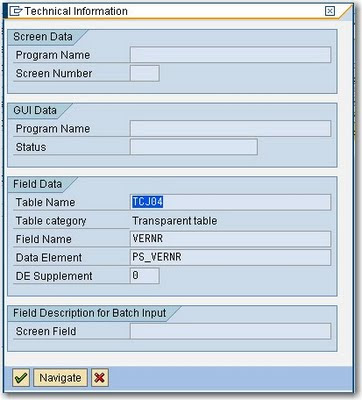
  4. Click on the Technical Information Icon on the Help Screen
  5. There you have it – the table name for the lookup - TCJ04:
  6. Double-click on the table name in the Technical Information form to View the Table Definition
  7. If you want, use transaction /nse16 to view the data and click Execute to confirm that the lookup information is the same as presented in the SAP GUI.

SAP Transaction and BAPI Knowledgebase

The SAP GUI is the default application for updating and viewing SAP data. While it is aimed at business and power users, it is quite an inaccesable rich client windows application with limited search functionality and the requirement to know many SAP "transaction codes" off the top of your head.

To help me (and you) a little, below is a list of some of the most useful transactions available in the SAP GUI Tool (pictured below). I've had to use them all more than once in my current SharePoint to SAP Integration Project and especially in writing combined SAP/SAP BPM/SharePoint technical specifications:

SAP Transactions (enter through SAP GUI transaction area in the top left hand side)

Note that you can prefix a transaction with /o (instead of /n) which will open the transaction up in a new window in the SAP GUI e.g. /ose11 for the ABAP dictionary
  1. /nse11 = ABAP Dictionary (for maintenance of tables and table data)
  2. /nse16 = Data Browser for Tables
  3. /nbapi = official UI for looking for built-in BAPIs with full documentation.
  4. /nse37 = Function Builder (for searching for custom BAPIs not in /nbapi)
  5. /ose24 - to find SAP classes (not BAPIs). Look here if you cannot find a BAPI that will do the job e.g. Vendor creation
  6. /soamanager = SOA manager
  7. /nsicf = Maintain web services
  8. /nswf_bam = Business Activity Monitoring (for SAP BPM)
  9. /nse80 = object explorer
  10. /nse10 = Transport Organizer (to see what is in a transport)
  11. /nXK02 = Change Vendor
  12. /nxk01 = create vendor
  13. /nme23n = Official Display Purchase Order, click “Other purchase order”
  14. /ncj03 = Display Project (NB. typically, any business object transaction ending in 01 is for create, 02 is update, 03 is for display)
  15. /h - turn on ABAP debugging (so you can work out what SAP GUI screens are doing in the background). Also allows you to write to tables directly with a workaround.
  16. /ncat2 - Timesheet entry
  17. /ncat7 - Transfer to Controlling (FICO).
  18. /ncats_da - Display Working Times
  19. /npa30 - Maintain HR Master Data.
  20. /nsu01 - User maintenance - so you can unlock users in SAP
  21. /nsxmb_moni - (For PI Server) - Integration Monitoring
Commonly Used Tables
  1. LFA1 - Vendor Master
  2. LFM1 - Vendor master record purchasing organization data
  3. EKKO - Purchasing Document Header
  4. EKPO - Purchasing Document Item (aka Line Items in your Purchase Order)
  5. T016 - List of Industries
  6. T000 - Clients
  7. T001 - Company Codes
  8. T005 - Countries
  9. T005 - Unit of Measurement (e.g. EA, Square Metres)
  10. PROJ - Projects
  11. PRPS - Work Breakdown structure (WBS) - basically project line items
  12. SKA1 - General Ledger Account master (aka Chart of Accounts)
Enterprise Services Additional Notes
  1. AccountDeterminationExpenseGroupCode is synonymous with GL (General Ledger) Code when working with Purchase Order Enterprise services.

    The SAP GUI - definitely not an intuitive application

Tuesday, 6 October 2009

SAP Web Dynpro Java - Adding a new Item row to an existing model object

As part of a proof of concept (PoC) for one of my clients, I had to create a purchase order form which had multiple items against it - using an Adobe Form in Adobe Lifecycle Forms Designer. Some articles suggested that a JavaScript client side call (e.g. Table1.Row1.instanceManager.addInstance(1); would work - but in Adobe Document Services, this would never render for me - even if I forced the render to the most recent version of Adobe (9.0). It was suggested by SAP consultants that we should just be doing a full post back to the server and adding items in the server side Java code instead.

For adding items in a dynamic table like this on the server side (using the SAP Purchase Order Create Web Service (PurchaseOrderCreateRequestConfirmation_In, SAP ECC604), see below:


public void onActionAddItemRow(com.sap.tc.webdynpro.progmodel.api.IWDCustomEvent wdEvent )
{
//@@begin onActionAddItemRow(ServerEvent)

// Here we get the current parent node of the model from the view
// context to which we want to add the item row

com.sap.demo.jrd.readpobyws.wd.readpowsmodel.PurchaseOrder poN = wdContext.currentPurchaseOrderElement().modelObject();

// Here we create a new, empty instance of the item row casting
// to the correct model class by using the associated model property
// of the parent node
// Note that at this point the instance is not yet bound to the item

com.sap.demo.jrd.readpobyws.wd.readpowsmodel.Item itemN = new Item((ReadPOWSModel) poN.associatedModel());

// Here we create an instance of a subnode of Item using the same
// approach
com.sap.demo.jrd.readpobyws.wd.readpowsmodel.SHORT_Description descN = new SHORT_Description((ReadPOWSModel) poN.associatedModel());

// If you wish to set default values in the leaf elements this is how
descN.set$0023SimpleContent("New item");
itemN.setID("99");

// Here we put the subnode for the Description into the parent Item
itemN.setDescription(descN);

// Here we create an instance of the subnode for the Accounting Coding
// Block Assignment using the same approach
com.sap.demo.jrd.readpobyws.wd.readpowsmodel.PurOrdERPItmByAcctgCodgBlkDistrRsp_SAcctgCodgBlkAssgmt aCBAsN = new PurOrdERPItmByAcctgCodgBlkDistrRsp_SAcctgCodgBlkAssgmt((ReadPOWSModel) poN.associatedModel());

// If you wish to set default values this is the example:
aCBAsN.setAccountDeterminationExpenseGroupCode("0000112000");

// Here we create an instance of the subnode for the Accounting Coding
// Block Distribution, i.e. the parent of the ACB Assignment
com.sap.demo.jrd.readpobyws.wd.readpowsmodel.PurOrdERPIdRsp_SAcctgCodgBlkDistr aCBDN =
new PurOrdERPIdRsp_SAcctgCodgBlkDistr((ReadPOWSModel) poN.associatedModel());

// Here we put the subnode for the ACB Assignment into the
// parent ACB Distribution
aCBDN.addAccountingCodingBlockAssignment(aCBAsN);

// Here we put the subnode ACB Distribution into the parent item
itemN.setAccountingCodingBlockDistribution(aCBDN);

// Finally – once the substructure has been built, we add the item
// to the purchase order node – i.e. set the item as a new row
poN.addItem(itemN);


//@@end
}

Friday, 18 September 2009

SAP to Microsoft .NET Integration - Fixes required to WSDL after referencing SAP BAPI WSDLs to work with .NET Service References in Visual Studio 2008

After referencing a Web Service that is based on a SAP BAPI (as opposed to a SAP Enterprise Service), you may need to save and modify the WSDL so to remove reserved words in the file. Otherwise, you will get compile-time errors from the Service Reference generated code such as:


An object reference is required for the non-static field, method, or property 'SharePointCustomLookup.CostCentreSearchService.Bapiret2.System.get'


Solution/Fix:
1. Save the WSDL from the HTTP location to your local machine (you can get this WSDL location if it is already set up from transaction /soamanager in SAP GUI). Open up the wsdl in your fave text editor.
2. Replace all instances of “System” with “SYSTEM” (To avoid conflicts with the System namespace in .NET)
3. Replace all instances of “parameters” with “parameter” so that parameters are read correctly by Visual Studio 2008.
4. Update your service reference to use the locally modified WSDL (which should have the correct endpoints to the web services on your SAP PI/ECC Server )

These modifications to the WSDL is not required for all BAPI Web Service calls - only ones which exhibit the compile-time issue.


One other important thing to note is that if your BAPI has an input parameter, then you have to instantiate the parameter AND all the lists and arrays which make up that input parameter - otherwise you won't get a return result.

e.g. For calling a Project Definition GetList BAPI, you have to instantiate parameter and the Project Definition List with a zero-sized array - otherwise you will NOT get any values back - and yet receive no error.


//You must instantiate the input parameter and any lists/arrays within that
//parameter for any results to be returned
Z_BAPI_PROJECTDEF_GETLISTClient client = new Z_BAPI_PROJECTDEF_GETLISTClient();
ProjectdefGetlist parameter = new ProjectdefGetlist();
parameter.ProjectDefinitionList = new Bapiprexp[0];
ProjectdefGetlistResponse response = client.ProjectdefGetlist(parameter);

Fix For SharePoint 2007 Workflow - "WorkflowValidationFailedException: The workflow failed validation."

If your workflow fails and goes to a status of "Failed on Start (retrying)", and you have declarative rule conditions in your workflow (or RuleSets), it is likely that your workflow cannot be loaded due to a validation error like the one below:

Engine RunWorkflow: System.Workflow.ComponentModel.Compiler.WorkflowValidationFailedException: The workflow failed validation.

FULL EXCEPTION FROM ULS:
08/31/2009 11:54:56.68 w3wp.exe (0x10DC) 0x047C Windows SharePoint Services Workflow Infrastructure 936l High Engine RunWorkflow: System.Workflow.ComponentModel.Compiler.WorkflowValidationFailedException: The workflow failed validation. at System.Workflow.Runtime.WorkflowDefinitionDispenser.ValidateDefinition(Activity root, Boolean isNewType, ITypeProvider typeProvider) at System.Workflow.Runtime.WorkflowDefinitionDispenser.LoadRootActivity(Type workflowType, Boolean createDefinition, Boolean initForRuntime) at System.Workflow.Runtime.WorkflowDefinitionDispenser.GetRootActivity(Type workflowType, Boolean createNew, Boolean initForRuntime) at System.Workflow.Runtime.WorkflowRuntime.InitializeExecutor(Guid instanceId, CreationContext context, WorkflowExecutor executor, WorkflowInstance workflowInstance) at System.Workflow.Runtime.WorkflowRuntime.Load(Guid key, CreationContext con... 08/31/2009 11:54:56.68* w3wp.exe (0x10DC) 0x047C Windows SharePoint Services Workflow Infrastructure 936l High ...text, WorkflowInstance workflowInstance) at System.Workflow.Runtime.WorkflowRuntime.GetWorkflowExecutor(Guid instanceId, CreationContext context) at System.Workflow.Runtime.WorkflowRuntime.InternalCreateWorkflow(CreationContext context, Guid instanceId) at System.Workflow.Runtime.WorkflowRuntime.CreateWorkflow(Type workflowType, Dictionary`2 namedArgumentValues, Guid instanceId) at Microsoft.SharePoint.Workflow.SPWinOeHostServices.Send(SPWinOeWorkflow winoeworkflow, SPWorkflowEvent e) at Microsoft.SharePoint.Workflow.SPWinOeEngine.RunWorkflow(Guid trackingId, SPWorkflowHostService host, SPWorkflow workflow, Collection`1 events, TimeSpan timeOut)


The Fix:

As described in http://blog.hhebnes.no/?tag=/workflows, the fix is to:

Edit the Visual Studio project file (using notepad) and add the second line below:

<Import Project="$(MSBuildBinPath)\Microsoft.CSharp.targets" />
<Import Project="$(MSBuildExtensionsPath)\Microsoft\Windows Workflow Foundation\v3.5\Workflow.Targets" />

Then reload the project and redeploy the wsp and everything will hopefully work. I suspect this might be an issue with WSPBuilder and the project it creates as it doesn't create .NET 3.5 projects by default.

Wednesday, 16 September 2009

InfoPath 2007 - Issue when adding Web Reference in Code Behind to SAP Enterprise Service


There is a bug when adding Web References to secured WSDL files in InfoPath 2007 Code (in Visual Studio Tools for Applications aka VSTA). For example, I received the following error when adding a Web eference to a SAP enterprise service:

Unable to cast COM object of type 'System.__ComObject' to interface type 'EnvDTE.IVsExtensibility'. This operation failed because the QueryInterface call on the COM component for the interface with IID '{3C536122-57B1-46DE-AB34-ACC524140093}' failed due to the following error: No such interface supported (Exception from HRESULT: 0x80004002 (E_NOINTERFACE)).

The simple fix is to save the wsdl file to your local file system e.g. C:\mySavedWSDL.wsdl) and use that wsdl file as a reference rather than pointing to the secured HTTP location for your WSDL source.