Showing posts with label InfoPath 2007. Show all posts

Friday, 12 March 2010

InfoPath 2007 - Fix for "Operation could not be completed" errors when opening InfoPath form in design view

If your InfoPath 2007 form suddenly stops working in design mode and you start to get the following error when opening the form in design mode:

"Operation could not be completed."

There are a few things you can do to try and fix it:
  1. Remove all the the local cache files from your machine (typically found in C:\Users\USERNAME\AppData\Local\Microsoft\InfoPath) - delete the "Designer2", "Cache2" and temp folders
  2. If that doesn't work, try running the form (e.g. in Visual Studio 2008, just right click on the form project and Click "Debug -> Start New Instance". When it opens, it will correct the project structure or re-add neccessary .NET assemblies to the project. Go to design mode again - and it will all start working (though all the tabs in the Designer window will now open). I suspect this happens if the xsf file is not correctly written to or some of your supporting files are readonly on save.

Thursday, 21 January 2010

Side-By-Side Versioning of InfoPath Browser Based Forms using SharePoint 2007 (aka how to have Multiple versions the same Form in the Same Forms Library)

When you have an InfoPath form live on your server, and you make a change to the schema of the form and upload it over the existing copy, your old forms won't open. You will just get a "Form has been closed" message or another kind of supporting error. To avoid killing off old versions of forms when deploying new versions, you simply have to do the following:
  1. Publish the form with a new name e.g. PurchaseOrderForm_V1-01.xsn using the Publish wizard either in InfoPath of Visual Studio 2008. Note that you cannot just publish and rename it as this will not change the FormId and instead potentially upgrade all your old forms to an incompatible version.


  2. Upload the file to the server via Central Admin > Applications Management > Upload Form Template
  3. Activate the form to your site collection. Look at the properties of the form from the Central Administration > Application Management > Manage Form Templates > View Properties - it should have the version in the form Id (e.g. urn:schemas-microsoft-com:office:infopath:PurchaseOrderForm-V1-01:-myXSD-2009-11-02T03-05-56)
  4. Go to My Form Library (e.g. "Purchase Order Forms" > Settings > Form Library Settings. Where the current content type is used.
  5. Add the new content type PurchaseOrderForm_V1-00 to the list.


  6. Rename the old Content Type (ie the current one in use that you want to preserve) to PurchaseOrderForm_V1-00 (this is typically the Name of the "Parent content Type"
  7. Rename the newly uploaded content type from PurchaseOrderForm_V1-00 to a friendly name the same as the old version e.g. "Purchase Order Form"


  8. Go to "Purchase Order Forms" > Settings > Form Library Settings > Change New Button Order and Default Content Type
  9. Hide the old content type as you don't want new instances created (e.g. hide "PurchaseOrderForm_V1-00") and show the new version "Purchase Order Form". It should be selected as the default content type.
  10. Finished - old versions of your form will still open without error and appear as they used to, and the new versions will open with the updated code base and schema.

    Also See http://www.delphi-ts.com/blogs/lozzi/post/2009/07/08/Versioning-Your-Published-InfoPath-Forms.aspx which has similar info. I also confirmed that this works if your Forms reference common code Dlls - the assemblies required for the forms are also not blown away as you are not upgrading.

Friday, 15 January 2010

Dynamically Modifying the Submit Location of InfoPath Forms using SharePoint Forms Services using Code Behind

It is a well known fact (e.g. http://blogs.msdn.com/sharepoint/archive/2007/07/25/scaling-large-lists.aspx) that SharePoint performance can decline significantly when there are more than 2000 items in a SharePoint "container"  (e.g. the root folder of a Document Library). To avoid this, you can store your documents in separate lists or you can store them in separate subfolders within your list.

On issue is that InfoPath 2007 doesn't support dynamic saving to subfolders out of the box (it only supports dynamic file names). You need to perform a code-based workaround to get it happening. In the code sample below, I dynamically submit to a folder location (ie a subfolder within a Document Library or List) based on the current date. All form submissions in this way are grouped by Year and Month (the client is not likely to have more than 2000 forms submitted in one month).

public void submitButton_Clicked(object sender, ClickedEventArgs e)
        {
            ////Need to submit the form to a programatically determined subfolder location (based on the date)
            //Folder format is 2010_01_January (YYYY_MM_MMMMM)
            FileSubmitConnection submitConnection = (FileSubmitConnection)DataConnections["SharePoint Library Submit"];
            submitConnection.FolderUrl = string.Format("{0}/{1}_{2}_{3}",submitConnection.FolderUrl ,
                DateTime.Today.Year, DateTime.Today.Month.ToString("00"), 
                System.Threading.Thread.CurrentThread.CurrentCulture.DateTimeFormat.GetMonthName(DateTime.Today.Month)); 
            submitConnection.Execute();
            ////TODO: Need to create folder with SP Object Model to hold attachments as well before saving them there.
        }

Thursday, 10 December 2009

InfoPath 2007 - Conditional values in InfoPath using XPath

I had a question today regarding Infopath and making conditional statements in Xpath:

Question

Hi Guys,
I was wondering if any of you have tried doing an if then else using xpath.
What I am trying to do is use a formula on an infopath form control.
This is what I want
If(field1 = “x”)
Then “1”
Else “2”
Ive had a look at some forums and you can do this with xpath2.0 but im using infopath2007 which I think uses xpath1.0
The work around seems to be something like this which I cant seem to get working either.
Concat(substring("1", 1, field1=”x” * string-length("1")), substring("2", 1, not(field1=”x”) * string-length("2")))
Any ideas would be great.
thanks


Answer

There are 2 options for this:
  1. You can use Conditional Statements within Rules e.g. on a text box to set the value conditionally in another field (much simpler than Xpath workarounds)
  2. You can use Xpath to give conditional results (effectively an "if" or "iif"). To implement the example in the question above, you could put this into an expression box (make sure "Xpath(Advanced)" is checked on):

    concat(substring("1", 1, (my:FieldA = "x") * string-length("1")), substring("2", 1, (not(my:FieldA = "x")) * string-length("2")))

The problem with the Xpath in the original question was that the parentheses were not in the correct positions. For more info on option 2, you can see http://blogs.msdn.com/infopath/archive/2006/11/27/conditional-default-values.aspx

Wednesday, 14 October 2009

Emulating SAP GUI in InfoPath 2007 - How to determine how extended lookup fields in the SAP GUI are populated & using the InfoPath SLP Addon

I've recently been creating browser based InfoPath forms as a frontend to SAP to make it a bit more palatable from the end user perspective. Most of the built-in forms in SAP GUI have a lookup mechanism that allows users lookup related data and pick a particular record. e.g. relate the Requesting Employee to a particular Purchase Order.


However, I had 2 issues in doing this:

  1. InfoPath doesn't have the ability to pop up a lookup form to permit the search for lookup information when creating records via a picker (as opposed to a dropdown with 1000s of records in it).
  2. It isn't obvious where the data comes from in the SAP GUI - it can be from SAP tables, views or function calls.


Resolution 1 - InfoPath Form:


For creating lookups/pickers for large datasets I used the SLP Addon for InfoPath 2007 (at http://hermansberghem.blogspot.com/2007/11/free-download-slp-infopath-extension.html). This allows lookup screens to be implemented outside the InfoPath form (it's not really feasible to have 1000s of SAP records show up in an InfoPath dropdown). I then created SharePoint Custom Application Pages which made calls to SAP Enterprise Services and to BAPIs exposed as web services to populate the lookup forms. This worked much better than I expected.


Resolution 2 - Determining Datasources of Lookup fields in SAP :

To work out how some of the equivalent lookup forms were populated in SAP, you can either cross your fingers and trawl through all the foreign key relationships and structures OR you can simply do the following:

  1. In SAP GUI, go to your transaction that does the lookup (e.g. Project Create Transaction /ncj01).
  2. Click on the field that does the lookup e.g. Person Responsible for the Project and click on the lookup helper button

  3. Press F1 for help when on the lookup screen

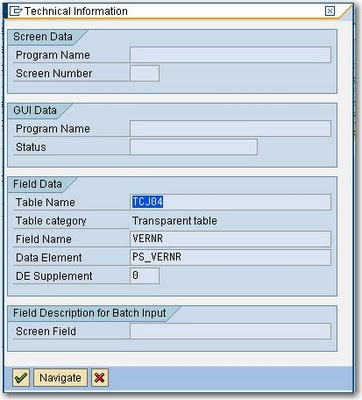
  4. Click on the Technical Information Icon on the Help Screen
  5. There you have it – the table name for the lookup - TCJ04:
  6. Double-click on the table name in the Technical Information form to View the Table Definition
  7. If you want, use transaction /nse16 to view the data and click Execute to confirm that the lookup information is the same as presented in the SAP GUI.

Wednesday, 16 September 2009

InfoPath 2007 - Issue when adding Web Reference in Code Behind to SAP Enterprise Service


There is a bug when adding Web References to secured WSDL files in InfoPath 2007 Code (in Visual Studio Tools for Applications aka VSTA). For example, I received the following error when adding a Web eference to a SAP enterprise service:

Unable to cast COM object of type 'System.__ComObject' to interface type 'EnvDTE.IVsExtensibility'. This operation failed because the QueryInterface call on the COM component for the interface with IID '{3C536122-57B1-46DE-AB34-ACC524140093}' failed due to the following error: No such interface supported (Exception from HRESULT: 0x80004002 (E_NOINTERFACE)).

The simple fix is to save the wsdl file to your local file system e.g. C:\mySavedWSDL.wsdl) and use that wsdl file as a reference rather than pointing to the secured HTTP location for your WSDL source.

Friday, 28 August 2009

InfoPath 2007 - Design Checker Error "Binding a non-repeating control to a repeating field or group is not supported by InfoPath Forms Services."

For read-only purposes, I had expression boxes in my InfoPath 2007 form (browser-enabled) that referred to (via XPath) repeating items within the form - but using an XPath sum(). Even though sum always returns a single value, InfoPath (erroneously) detects the use of the repeating table (i.e. I am trying to sum the total purchase order items). It then shows the following error in the Design Checker:

Binding a non-repeating control to a repeating field or group is not supported by InfoPath Forms Services. To fix this problem, remove the control or replace it with a repeating control, such as repeating section or table."


I automatically assumed that this would be the same as other "errors" and would prevent the publication and activation of this form. This is not the case. In fact, the Design Checker should really should show as a warning, as you can safely ignore the "error" and publish anyway.


Tuesday, 7 July 2009

Fix - "There has been an error while processing the form" when Submitting a browser enabled InfoPath Form

I just redeployed an InfoPath 2007 form to a SharePoint 2007 server location that had previously been working fine in our SharePoint UAT and DEV environments. Problem is, it just stopped working on submission with the error
"There has been an error while processing the form". In the Event log and ULS Logs.

There was a form postback error. (User: DOMAINNAME\USERNAME, Form Name: RenewalOfLeaseForm, IP: , Request: http://SERVERNAME/_layouts/Postback.FormServer.aspx, Form ID: urn:schemas-microsoft-com:office:infopath:RenewalOfLeaseForm:-myXSD-2009-05-07T05-54-18, Type: ArgumentException, Exception Message: Value does not fall within the expected range.)

None of the validation picked up any issues and deployment all worked fine - but errors occurred on submission. Some articles suggested (e.g. http://www.infopathdev.com/forums/p/5546/25579.aspx ) that the problem was with a secondary datasource - but this would not explain why it was working in the other environments.

Turns out the problem was that when I specified the location of the form template during publication to the production environment, I pasted an extra forward slash into the publishing wizard (see screenshot). This only seemed to generate an error on the submission of the form - but it published without issues. This would suggest that the publication wizard should really do some additional validation when publishing InfoPath forms to a SharePoint location.

Wednesday, 10 June 2009

Workaround - Contact Selector does not work in Browser-based InfoPath forms

While this blog hints otherwise, http://blogs.msdn.com/infopath/archive/2007/02/28/using-the-contact-selector-control.aspx, it is not possible to use the InfoPath Contact Selector control when hosting InfoPath forms in the browser.

To get around this issue, you can either:
  1. Move to ASP.NET Pages for your task form
  2. Use a dropdown instead in your InfoPath form. You can programmatically populate it as described here: http://www.bizsupportonline.net/infopath2007/programmatically-fill-populate-drop-down-list-box-infopath-2007.htm

Thursday, 4 June 2009

Fix - "There is an error in XML document (1, 2)" when deserializing an InfoPath 2007 in a SharePoint Workflow


If you are getting the following errors when attempting to deserialize an InfoPath Form for use in a workflow:
  1. "There is an error in XML document (1, 2)" And the the Inner Exception is
  2. <myFields xmlns='http://schemas.microsoft.com/office/infopath/2003/myXSD/2008-01-16T10:47:10'> was not expected.

Then I suggest that you first check the following:


  1. The root element name of your InfoPath form (by default called "myfields") MUST match the class name of your xsd.exe-generated mapping file.

Otherwise the XmlSerializer will be looking for a root "myfields" (the default name) element in your C# class and it won't be able to map it to the equivalent element in your InfoPath Xml.

In other words, the xsd.exe generated wrapper class name must match the root element name of your InfoPath form.

For reference, I had this issue and it was simply because I renamed the class name of my xsd.exe-generated file (but I didn't rename my root Infopath element) and so the Serializer couldn't map the new class name to the old root element name in my InfoPath form.


Wednesday, 3 June 2009

The following URL is not valid: Error when publishing an InfoPath 2007 form to a SharePoint Library

As per the following link http://joeshepherd.spaces.live.com/blog/cns!9AE2097A4A610B63!137.entry, there is an issue with the System Event Notification Service that will prevent publication of an InfoPath form when there is not network connection (e.g. your Virtual Machine has network connectivity disabled). To fix this issue, disable the System Event notification service while publishing your InfoPath form template.

As per my previous post (http://ddkonline.blogspot.com/2009/02/fix-error-occurred-either-in-outlook-or.html - related to an Outlook issue) you can do this by typing the following at a command prompt:
  1. At a command prompt, type "net stop sens" and Enter
  2. Publish your InfoPath form
  3. Then to restart it, type "net start sens".

InfoPath 2007 Forms using Forms Services in SharePoint 2007 - "This form cannot be opened. It is not workflow enabled."

You may find that when you try and open an InfoPath form (e.g. as the initiation form of a workflow) that it just says "This form cannot be opened. It is not workflow enabled".

If you go to Central Administration -> Applications Management -> Manage Form Templates, it will show your form with the Status of Installing on a permanent basis. This will never complete - so what can you do about it?

This is because the real error when uploading your form is hidden so the install of the form never completes. To discover the real error, click on the "Upload Form Template" button. Enter the file name of your Infopath template (xsn) file (typically located at http://myserverurl/_admin/UploadFormTemplate.aspx) and click the "Verify" button. Resolve these issues and the InfoPath form will deploy and install properly.

The issue I had was that:
  1. I had created a new InfoPath form
  2. I had published it but had not left the section entitled "If users access the form template from the published location by using a different path, such as a public URL or full network path, enter it below, and then click Next." section BLANK (otherwise it won't work)
  3. You need to use the published version of the Form template, not the original design.