Showing posts with label SAP. Show all posts

Friday, 17 December 2010

How to Use BAPI_CUSTOMER_FIND to search for Customers in SAP

BAPI's are a useful way of retrieving data in SAP for testing purposes - even if they are not the recommended way of retrieving data from SAP from external systems (you should use Enterprise Services for that).  I had a problem with the quirks of one of the BAPIs today - the SAP BAPI "BAPI_CUSTOMER_FIND" wouldn't allow me to perform a wildcard search on the Customer Name (the KNA1.NAME1 field). Exact matches worked fine. Turns out there is a field "PL_HOLD" in the input parameters that has to have a value of "X" in order for wildcard matches to work at all.

So the process is:

  1. Work out the field and table name that you want with SAP transaction /nse11
  2. Test the BAPI:
  3. Make sure that MAX_COUNT is 200, or the desired maximum number of return values. Use 0 for an unlimited number of return results.
  4. Make sure PL_HOLD is X to enable wildcard matching
  5. Put the TableName (e.g. KNA1 for customer master), field name (e.g. NAME1 for customer name) and the wildcard in the SELOPT_TAB table
  6. Run your BAPI to perform the search.


Of couse you wouldn't need to worry about this if you are just using SOAPUI and the CustomerSimpleByNameAndAddressQuery enterprise service as it has no such flags to enable the wildcard searching - but that's another story.

DDK

Tuesday, 13 July 2010

Fix for WCF Client Proxy deserialization issue (related to svcutil.exe) when referencing Non-Microsoft Services (e.g. SAP services from SharePoint) - "Unable to generate a temporary class (result=1)."

When creating a client proxy for the SAP Service Registry (so I could dynamically set endpoints for my other WCF client calls), I had the following issue today when running a unit test:

Test method DDK.UnitTest.UDDIProxyTest.GetEndPointBasicTest threw exception: System.ServiceModel.CommunicationException: There was an error in serializing body of message findServiceDefinitionsRequest: 'Unable to generate a temporary class (result=1).

error CS0030: Cannot convert type 'DDK.BusinessService.UDDIRegistrySearchProxy.classificationPair[]' to 'DDK.BusinessService.UDDIRegistrySearchProxy.classificationPair'

This error is a result of issues with .NET commandline tools wsdl.exe or svcutil.exe incorrectly creating multidimensional arrays in the strongly typed proxy class (Reference.cs), as per screenshot below:


Cause:
This problem occurs when the svcutil.exe or the Web Services Description Language Tool (Wsdl.exe) are used to generate the client information. When you publish a schema that contains nested nodes that have the maxOccurs attribute set to the "unbounded" value, these tools create multidimensional arrays in the generated datatypes.cs file. Therefore, the generated Reference.cs file contains incorrect types for the nested nodes.

The problem and fix is described in the following kb articles:
http://support.microsoft.com/kb/891386 and 
http://support.microsoft.com/kb/326790/en-us

The fix is to basically change the multi-dimensional array in the Reference.cs file related to your service reference to a single dimension.
e.g.

classificationPair[] [] 
instead becomes
classificationPair[] 

Note that you will of course need to update all parameter references in the Reference.cs file to this multi-dimensional array, not just the original declarations.
DDK

Wednesday, 5 May 2010

Error when creating Purchase Order using SAP BAPI_PO_CREATE1 Error - "Material purchase order" is not allowed"

If you get the following error when attempting to create a Purchase Order with Project/WBS related line items:

No instance of object type PurchaseOrder has been created. External reference: ; Purchase order still contains faulty items ; "Material purchase order" is not allowed


The issue may be that the Project (to which you are trying to allocate the cost) is either unapproved or Inactive. Check the status of the WBS or Project that you have chosen and try again.

DDK

Tuesday, 2 February 2010

How to Perform Wild Card Matches in SAP ABAP (for a Find or Search Function)

The following BAPI has several optional criteria that are only added to the filter if they have a value. It uses the RANGE keyword and the IN keyword together to build up the query filter. It is an alternative to building a dynamic query (based purely on string concatenation). Note that this works because the range object is null in the final comparison statment in this BAPI so it will not be added to the filter, (e.g. "AND BUKRS IN R_BUKRS" will effectively be "AND BUKRS IN NULL" and so will not be evaluated in the WHERE clause.).

FUNCTION Z_PO_FIND.
*"----------------------------------------------------------------------
*"*"Local Interface:
*" IMPORTING
*" VALUE(I_PO_NUMBER) TYPE EKKO-EBELN OPTIONAL
*" VALUE(I_COMPANY_CODE) TYPE EKKO-BUKRS OPTIONAL
*" VALUE(I_PURCH_GROUP) TYPE EKKO-EKGRP OPTIONAL
*" VALUE(I_DOC_START_DATE) TYPE EKKO-AEDAT DEFAULT '01.01.0001'
*" VALUE(I_DOC_END_DATE) TYPE EKKO-AEDAT DEFAULT '31.12.9999'
*" TABLES
*" T_EKKO STRUCTURE EKKO OPTIONAL
*"----------------------------------------------------------------------
RANGES: R_EBELN FOR EKKO-EBELN,
R_BUKRS FOR EKKO-BUKRS,
R_EKGRP FOR EKKO-EKGRP,
R_AEDAT FOR EKKO-AEDAT.

DATA: W_WILD TYPE C LENGTH 1 VALUE '*',
W_PO_NUMBER LIKE EKKO-EBELN.

* Set PO Number range
IF I_PO_NUMBER IS NOT INITIAL.
SHIFT I_PO_NUMBER LEFT DELETING LEADING '0'.
CONCATENATE W_WILD I_PO_NUMBER W_WILD INTO W_PO_NUMBER.

R_EBELN-OPTION = 'CP'.
R_EBELN-SIGN = 'I'.
R_EBELN-LOW = W_PO_NUMBER.
APPEND R_EBELN.
ENDIF.

* Set Company Code range
IF I_COMPANY_CODE IS NOT INITIAL.
R_BUKRS-OPTION = 'EQ'.
R_BUKRS-SIGN = 'I'.
R_BUKRS-LOW = I_COMPANY_CODE.
APPEND R_BUKRS.
ENDIF.

* Set Purchasing Group range
IF NOT I_PURCH_GROUP IS INITIAL.
R_EKGRP-OPTION = 'EQ'.
R_EKGRP-SIGN = 'I'.
R_EKGRP-LOW = I_PURCH_GROUP.
APPEND R_EKGRP.
ENDIF.

* Set date range
R_AEDAT-OPTION = 'BT'.
R_AEDAT-SIGN = 'I'.
R_AEDAT-LOW = I_DOC_START_DATE.
R_AEDAT-HIGH = I_DOC_END_DATE.
APPEND R_AEDAT.

* Select records from table EKKO
SELECT * FROM EKKO INTO T_EKKO
WHERE EBELN IN R_EBELN
AND BUKRS IN R_BUKRS
AND EKGRP IN R_EKGRP
AND AEDAT IN R_AEDAT.
APPEND T_EKKO.
ENDSELECT.

ENDFUNCTION.

Wednesday, 23 December 2009

Steps for Setting up an SAP Enterprise Service to be consumed from an external application such as SharePoint

  1. Go to SAP GUI
  2. Run transaction /nsproxy. This will show what services are available to expose as endpoints, including your own custom created services (otherwise you have to download or create it).
  3. In transaction /nsproxy, search for your service by clicking the binoculars icon e.g. the EmployeeBasicDataByEmployeeQueryResponse_In Service in the Enterprise Service repository. Alternatively you can browse for the Service you are looking for (as pictured above).
  4. Note that there are no service endpoints defined if you go to the WSDL tab when viewing the service details.
  5. Go to transaction /nsoamanager in SAP GUI
  6. Go to the “Application And Scenario Communication” Tab ->; “Single Service Administration”.
  7. Search for the name of the service as found in sproxy (e.g. EmployeeBasicDataByEmployeeQueryResponse_In)
  8. Select the Service in the search results and click “Apply Selection”. Notice that there are no Bindings Listed if you click on “Display Selected Binding’s WSDL”
  9. Click the "Configurations" tab and Click the "Create Service" button. Enter a service name e.g. EmployeeBasicDataByEmployeeQueryResponse_In_Service, and a description

  10. Also enter a binding name e.g. EmployeeBasicDataByEmployeeQueryResponse_In_Binding, and Click “Apply Settings”
  11. A new set of tabs should appear at the bottom of your screen. Enter details for the provider security
  12. Click “Save”
  13. The service is not activated yet. Even if you try and open the service with SOAP UI at this stage, you will just get errors such as "“Logon Error Message. What has happened? URL http://servername:serverport/sap/bc/srt/xip/sap/ecc_employeebasicdbyemployeeqr/120/employeebasicdatabyemployeequery/employeebasicdatabyemployeequeryresponse_in_binding call was terminated because the corresponding service is not available."
  14. To activate the service, go to transaction /nsicf in SAP GUI
  15. Search for the service e.g. put “EMPLOYEE*” in the service name. This should find your service e.g. “EmployeeBasicDataByEmployeeQuery”
  16. Right click on the service at the bottom level and click Activate, and click on the “Yes” button (yes it is odd that there are 2 – I don’t know the difference).
  17. You should be able to call the web service through SOAP UI or any other web services client or tool (e.g. Visual Studio .NET). Make sure you enter a username and password under the “Auth” tab of the request (if using SOAP UI 3.0).
  18. DONE!

Wednesday, 16 December 2009

SAP ABAP and Case sensitivity of the LIKE clause Versus the CS (Contains String) Keyword

I had an issue today with a custom BAPI (using SAP's proprietary language ABAP) that would just NOT return values that I knew were in the PRPS.POST1 field. It turned out that it was a case sensitivity problem - as the LIKE clause in SAP is case sensitive. Typically users don't care about case at all and expect that a search for "Test" will return all upper case and lower case variations (e.g. Test, TEst, TEST, etc).

Unfortunately there is no equivalent of the UPPER() statement in standard SQL Syntax. There are 2 workarounds that I'm aware of:
  1. If you are lucky, there is a field with the same name defined for text fields which has all upper case characters and suffixed with "U". For example, the upper case equivalent of POST1 is the POSTU field. You can then do case insensitive searches on the field by forcing your input parameter to upper case.
  2. Use the CS (Contains String) Function instead of the LIKE clause within your select.....endselect

See below for details of a real-world example of how to use the CS clause for case-insensitive searches:

The below custom BAPI function accepts a spend type (e.g. Capital Expenditure (CAPEX), Operational Expenditure (OPEX)) company code parameter and a wildcard search field and then populates different objects based on the spend type. For example, a Spend type of OPEX will return a list of Cost Centres into the T_TYPE_OKH_COST_CENTRE Table as an output, a spend type of Asset will return a list of assets into the the T_TYPE_A_ASSET structure in the output.

Sample Search BAPI Code (ABAP)


FUNCTION Z_BAPI_COST_OBJECT_FIND.
*"----------------------------------------------------------------------
*"*"Local Interface:
*" IMPORTING
*" VALUE(I_SPEND_TYPE) TYPE EKPO-KNTTP
*" VALUE(I_COMPANY_CODE) TYPE PRPS-PBUKR
*" VALUE(I_COST_OBJECT) TYPE CHAR_50
*" TABLES
*" T_TYPE_P_WBS STRUCTURE ZFPRPS
*" T_TYPE_OKH_COST_CENTRE STRUCTURE ZFCSKS
*" T_TYPE_A_ASSET STRUCTURE ZFANLA
*" EXCEPTIONS
*" EXCEPTION
*"----------------------------------------------------------------------

tables: prps, csks, anla.
data: projdesc(50) TYPE C.

*The below statements use a CS statement rather than the like clause of SQL
*because LIKE is case sensitive in SAP - unfortunately there is no equivalent
* of UPPER() same as in Native SQL Server.

* Get Cost Object of type WBS
* and POSKI LIKE I_COST_OBJECT."
* We need to do a cast
if I_SPEND_TYPE = 'P'.
select * from PRPS
where BELKZ = 'X'
and PBUKR = I_COMPANY_CODE.
* and ( POSID LIKE I_COST_OBJECT or POST1 LIKE I_COST_OBJECT ).
move PRPS-POST1 to projdesc.

if PRPS-TADAT IS INITIAL and
( PRPS-POSID CS I_COST_OBJECT
or projdesc CS I_COST_OBJECT ).
move PRPS-PSPNR to T_TYPE_P_WBS-PSPNR.
move PRPS-POSID to T_TYPE_P_WBS-POSID.
move PRPS-POST1 to T_TYPE_P_WBS-POST1.
append T_TYPE_P_WBS.
endif.
endselect.

* Get Cost Object of type Cost Centre for Retail, Office and Industrial
elseif I_SPEND_TYPE = 'O'.
select * from CSKS
where BUKRS = I_COMPANY_CODE
and ( ABTEI = 'RETAIL'
or ABTEI = 'OFFICE'
or ABTEI = 'INDUSTRIAL'
or ABTEI = '12' ).

if CSKS-NAME1 CS I_COST_OBJECT
or CSKS-KOSTL CS I_COST_OBJECT.

move CSKS-KOKRS to T_TYPE_OKH_COST_CENTRE-KOKRS.
move CSKS-KOSTL to T_TYPE_OKH_COST_CENTRE-KOSTL.
move CSKS-DATBI to T_TYPE_OKH_COST_CENTRE-DATBI.

append T_TYPE_OKH_COST_CENTRE.
endif.

endselect.

* Get Cost Object of type Cost Centre for Marketing
elseif I_SPEND_TYPE = 'K'.
select * from CSKS
where BUKRS = I_COMPANY_CODE
* and ABTEI = 'MARKETING'.
and ABTEI = '12'.

*Conditionally
if CSKS-NAME1 CS I_COST_OBJECT
or CSKS-KOSTL CS I_COST_OBJECT.
move CSKS-KOKRS to T_TYPE_OKH_COST_CENTRE-KOKRS.
move CSKS-KOSTL to T_TYPE_OKH_COST_CENTRE-KOSTL.
move CSKS-DATBI to T_TYPE_OKH_COST_CENTRE-DATBI.
append T_TYPE_OKH_COST_CENTRE.
endif.
endselect.

* Get Cost Object of type Cost Centre for Head Office
elseif I_SPEND_TYPE = 'H'.
select * from CSKS
where BUKRS = I_COMPANY_CODE
and ( ABTEI = 'CORPORATE'
or ABTEI = '12' ).

move CSKS-KOKRS to T_TYPE_OKH_COST_CENTRE-KOKRS.
move CSKS-KOSTL to T_TYPE_OKH_COST_CENTRE-KOSTL.
move CSKS-DATBI to T_TYPE_OKH_COST_CENTRE-DATBI.

append T_TYPE_OKH_COST_CENTRE.

endselect.

* Get Cost Object of type Asset
elseif I_SPEND_TYPE = 'A'.
select * from ANLA
where BUKRS = I_COMPANY_CODE
and ( ANLKL = '13000000'
or ANLKL = '14000000' ).

if ANLA-ANLN1 CS I_COST_OBJECT or
ANLA-TXT50 CS I_COST_OBJECT.
move ANLA-BUKRS to T_TYPE_A_ASSET-BUKRS.
move ANLA-ANLN1 to T_TYPE_A_ASSET-ANLN1.
move ANLA-ANLN2 to T_TYPE_A_ASSET-ANLN2.

append T_TYPE_A_ASSET.
endif.
endselect.

endif.

ENDFUNCTION.


Additional Notes

1) Spaces DO matter around parentheses - the following will NOT work:

INCORRECT:
select * from PRPS
where BELKZ = 'X'
and PBUKR = I_COMPANY_CODE
and (POSKI LIKE I_COST_OBJECT or POST1 = I_COST_OBJECT).
endselect.

CORRECT:
The following is correct syntax
select * from PRPS
where BELKZ = 'X'
and PBUKR = I_COMPANY_CODE
and ( POSKI LIKE I_COST_OBJECT or POST1 = I_COST_OBJECT ).
endselect.


2) All statements should end with a period. (ie similar to the use of the semicolon as a line delimiter in C#)

Wednesday, 2 December 2009

"The service implementation selected is invalid." when attempting to create a web service in SAP Netweaver Developer Studio

I'm currently trying to get the SAP universal worklist APIs to provide information to SharePoint via a web service (to ensure there is only a single task list for users to see). To this end, I needed to create a web service hosted on the SAP BPM server.

When attempting to create a Java Web service (e.g. a bottom up service, based on a java bean service implementation) in Netweaver Developer Studio (NWDS), you might receive the following cryptic error message:


"The service implementation selected is invalid."

It is as clear as mud - but the issue here is that the class name of the service implementation is lower case. To resolve the issue, just refactor the class with a right click on the offending java file and change the first letter to upper case. Quite painful if you ask me - they really need a better explanation than that in their user interface!


Fix it with a refactor:


Tuesday, 17 November 2009

Where to find the SAP Universal Worklist (UWL) API jar files (bc.uwl.service.api_api.jar, bc.uwl.service.api_core.jar, com.sap.security.api.jar)

Apparently with Netweaver Developer Studio (NWDS) 7.0, the UWL API files for accessing the Universal Worklist in SAP were included with the install. However, in NWDS 7.1, it appears that the following files are no longer included:

  • bc.uwl.service.api_api.jar
  • bc.uwl.service.api_core.jar
  • com.sap.security.api.jar

To obtain these files, you need to go to the SAP patches site at http://service.sap.com/patches.

Then navigate to:

"Support Packages and Patches - Entry by Application Group" ->
"SAP Netweaver" ->
"SAP Netweaver" (yes the same menu item twice) ->
"SAP EHP1 FOR SAP NW CE 7.1" ->
"Entry by Component" ->
"BPM Portal Integration" ->
"UWL COLL PROCESS ENGINE 7.11" ->
Download one of the patch files e.g. UWLJWF03_0-20002656.SCA


Then once downloaded, you can just import the SCA file into your project through Netweaver Developer studio or you can rename the file to a zip and extract the jar files you need.

Wednesday, 14 October 2009

SAP - Creating and Updating Vendor Master Records through SAP API

As an ERP, you would think that programatically creating a basic Vendor record in SAP would be one of the basic, easily accessible functions right?

WRONG! (Thunderclap ensues...)

When creating technical specifications for a vendor create function being called from SAP BPM, I tried to find how to programmatically create a Vendor. Unfortunately, this area is not well documented (like many areas of SAP) so I had to do the usual exhaustive/brute force search for the correct Function Module or Class Calls to make. This is what I found:

  1. There is a BAPI in SAP called "BAPI_VENDOR_CREATE" that I found through standard transaction /nbapi - however if you look at the definition it doesn't actually have any parameters. This effectively makes it useless. Obviously it is for internal use!

  2. The SAP Enterprise Service (BusinessPartnerDataManagementSupplierIn) is not comprehensive at all - it has a create, but not an update. Seems like quite an oversight to me... I am reluctant to use the enterprise service (which is the "Best Practice" Method of making updates to SAP) for the "Create Vendor" call, but another API set for the Update of that same Vendor. My search continues...
  3. Perhaps it is available as a Class, not a BAPI or Enterprise Service.... so I went to transaction /nse80 (Repository Browser) and did several exhaustive searches on SAP classes. I eventually found a few possible candidates - and nailed it down to the "Vendor Maintenance API" - VMD_EI_API, which has an "INITIALIZE" Method and a "MAINTENANCE" method which allows for the create and the update of vendors. Voila!

    Using the Repository Browser to nail down that Vendor Create API:

Found the needle in the proverbial haystack at the bottom of the search list (VMD_EI_API - the SAP Vendor Maintenance API):

Here is the model we used to call this from web services (done via SAP PI to simplify mapping):


UPDATE (14 Oct 2009) : Obviously other people have been having the same issue trying to find the API - as per my post on the SAP Developer Network (SDN) - https://forumsa.sdn.sap.com/thread.jspa?messageID=8283585#8283585


SAP - How to find which SAP Classes, Interfaces and BAPIs write to a particular SAP Table in SAP GUI

  1. In SAP GUI, go to /nse11 and enter your table name (e.g. Table "LFA1" for SAP Vendors).
  2. Click display to display the table (this is just transaction SE11_OLD)
  3. Just choose Programs, Classes/Interfaces and click Execute. You will be provided with a full list of the BAPIs, classes and interfaces that reference that table.
  4. Alternatively you can use transaction /nse37 to search for BAPIs that have a name similar to the table or the functionality they expose (e.g. *VENDOR*).

Emulating SAP GUI in InfoPath 2007 - How to determine how extended lookup fields in the SAP GUI are populated & using the InfoPath SLP Addon

I've recently been creating browser based InfoPath forms as a frontend to SAP to make it a bit more palatable from the end user perspective. Most of the built-in forms in SAP GUI have a lookup mechanism that allows users lookup related data and pick a particular record. e.g. relate the Requesting Employee to a particular Purchase Order.


However, I had 2 issues in doing this:

  1. InfoPath doesn't have the ability to pop up a lookup form to permit the search for lookup information when creating records via a picker (as opposed to a dropdown with 1000s of records in it).
  2. It isn't obvious where the data comes from in the SAP GUI - it can be from SAP tables, views or function calls.


Resolution 1 - InfoPath Form:


For creating lookups/pickers for large datasets I used the SLP Addon for InfoPath 2007 (at http://hermansberghem.blogspot.com/2007/11/free-download-slp-infopath-extension.html). This allows lookup screens to be implemented outside the InfoPath form (it's not really feasible to have 1000s of SAP records show up in an InfoPath dropdown). I then created SharePoint Custom Application Pages which made calls to SAP Enterprise Services and to BAPIs exposed as web services to populate the lookup forms. This worked much better than I expected.


Resolution 2 - Determining Datasources of Lookup fields in SAP :

To work out how some of the equivalent lookup forms were populated in SAP, you can either cross your fingers and trawl through all the foreign key relationships and structures OR you can simply do the following:

  1. In SAP GUI, go to your transaction that does the lookup (e.g. Project Create Transaction /ncj01).
  2. Click on the field that does the lookup e.g. Person Responsible for the Project and click on the lookup helper button

  3. Press F1 for help when on the lookup screen

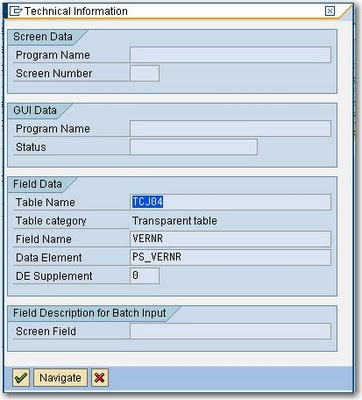
  4. Click on the Technical Information Icon on the Help Screen
  5. There you have it – the table name for the lookup - TCJ04:
  6. Double-click on the table name in the Technical Information form to View the Table Definition
  7. If you want, use transaction /nse16 to view the data and click Execute to confirm that the lookup information is the same as presented in the SAP GUI.

SAP Transaction and BAPI Knowledgebase

The SAP GUI is the default application for updating and viewing SAP data. While it is aimed at business and power users, it is quite an inaccesable rich client windows application with limited search functionality and the requirement to know many SAP "transaction codes" off the top of your head.

To help me (and you) a little, below is a list of some of the most useful transactions available in the SAP GUI Tool (pictured below). I've had to use them all more than once in my current SharePoint to SAP Integration Project and especially in writing combined SAP/SAP BPM/SharePoint technical specifications:

SAP Transactions (enter through SAP GUI transaction area in the top left hand side)

Note that you can prefix a transaction with /o (instead of /n) which will open the transaction up in a new window in the SAP GUI e.g. /ose11 for the ABAP dictionary
  1. /nse11 = ABAP Dictionary (for maintenance of tables and table data)
  2. /nse16 = Data Browser for Tables
  3. /nbapi = official UI for looking for built-in BAPIs with full documentation.
  4. /nse37 = Function Builder (for searching for custom BAPIs not in /nbapi)
  5. /ose24 - to find SAP classes (not BAPIs). Look here if you cannot find a BAPI that will do the job e.g. Vendor creation
  6. /soamanager = SOA manager
  7. /nsicf = Maintain web services
  8. /nswf_bam = Business Activity Monitoring (for SAP BPM)
  9. /nse80 = object explorer
  10. /nse10 = Transport Organizer (to see what is in a transport)
  11. /nXK02 = Change Vendor
  12. /nxk01 = create vendor
  13. /nme23n = Official Display Purchase Order, click “Other purchase order”
  14. /ncj03 = Display Project (NB. typically, any business object transaction ending in 01 is for create, 02 is update, 03 is for display)
  15. /h - turn on ABAP debugging (so you can work out what SAP GUI screens are doing in the background). Also allows you to write to tables directly with a workaround.
  16. /ncat2 - Timesheet entry
  17. /ncat7 - Transfer to Controlling (FICO).
  18. /ncats_da - Display Working Times
  19. /npa30 - Maintain HR Master Data.
  20. /nsu01 - User maintenance - so you can unlock users in SAP
  21. /nsxmb_moni - (For PI Server) - Integration Monitoring
Commonly Used Tables
  1. LFA1 - Vendor Master
  2. LFM1 - Vendor master record purchasing organization data
  3. EKKO - Purchasing Document Header
  4. EKPO - Purchasing Document Item (aka Line Items in your Purchase Order)
  5. T016 - List of Industries
  6. T000 - Clients
  7. T001 - Company Codes
  8. T005 - Countries
  9. T005 - Unit of Measurement (e.g. EA, Square Metres)
  10. PROJ - Projects
  11. PRPS - Work Breakdown structure (WBS) - basically project line items
  12. SKA1 - General Ledger Account master (aka Chart of Accounts)
Enterprise Services Additional Notes
  1. AccountDeterminationExpenseGroupCode is synonymous with GL (General Ledger) Code when working with Purchase Order Enterprise services.

    The SAP GUI - definitely not an intuitive application

Tuesday, 6 October 2009

SAP Web Dynpro Java - Adding a new Item row to an existing model object

As part of a proof of concept (PoC) for one of my clients, I had to create a purchase order form which had multiple items against it - using an Adobe Form in Adobe Lifecycle Forms Designer. Some articles suggested that a JavaScript client side call (e.g. Table1.Row1.instanceManager.addInstance(1); would work - but in Adobe Document Services, this would never render for me - even if I forced the render to the most recent version of Adobe (9.0). It was suggested by SAP consultants that we should just be doing a full post back to the server and adding items in the server side Java code instead.

For adding items in a dynamic table like this on the server side (using the SAP Purchase Order Create Web Service (PurchaseOrderCreateRequestConfirmation_In, SAP ECC604), see below:


public void onActionAddItemRow(com.sap.tc.webdynpro.progmodel.api.IWDCustomEvent wdEvent )
{
//@@begin onActionAddItemRow(ServerEvent)

// Here we get the current parent node of the model from the view
// context to which we want to add the item row

com.sap.demo.jrd.readpobyws.wd.readpowsmodel.PurchaseOrder poN = wdContext.currentPurchaseOrderElement().modelObject();

// Here we create a new, empty instance of the item row casting
// to the correct model class by using the associated model property
// of the parent node
// Note that at this point the instance is not yet bound to the item

com.sap.demo.jrd.readpobyws.wd.readpowsmodel.Item itemN = new Item((ReadPOWSModel) poN.associatedModel());

// Here we create an instance of a subnode of Item using the same
// approach
com.sap.demo.jrd.readpobyws.wd.readpowsmodel.SHORT_Description descN = new SHORT_Description((ReadPOWSModel) poN.associatedModel());

// If you wish to set default values in the leaf elements this is how
descN.set$0023SimpleContent("New item");
itemN.setID("99");

// Here we put the subnode for the Description into the parent Item
itemN.setDescription(descN);

// Here we create an instance of the subnode for the Accounting Coding
// Block Assignment using the same approach
com.sap.demo.jrd.readpobyws.wd.readpowsmodel.PurOrdERPItmByAcctgCodgBlkDistrRsp_SAcctgCodgBlkAssgmt aCBAsN = new PurOrdERPItmByAcctgCodgBlkDistrRsp_SAcctgCodgBlkAssgmt((ReadPOWSModel) poN.associatedModel());

// If you wish to set default values this is the example:
aCBAsN.setAccountDeterminationExpenseGroupCode("0000112000");

// Here we create an instance of the subnode for the Accounting Coding
// Block Distribution, i.e. the parent of the ACB Assignment
com.sap.demo.jrd.readpobyws.wd.readpowsmodel.PurOrdERPIdRsp_SAcctgCodgBlkDistr aCBDN =
new PurOrdERPIdRsp_SAcctgCodgBlkDistr((ReadPOWSModel) poN.associatedModel());

// Here we put the subnode for the ACB Assignment into the
// parent ACB Distribution
aCBDN.addAccountingCodingBlockAssignment(aCBAsN);

// Here we put the subnode ACB Distribution into the parent item
itemN.setAccountingCodingBlockDistribution(aCBDN);

// Finally – once the substructure has been built, we add the item
// to the purchase order node – i.e. set the item as a new row
poN.addItem(itemN);


//@@end
}

Friday, 18 September 2009

SAP to Microsoft .NET Integration - Fixes required to WSDL after referencing SAP BAPI WSDLs to work with .NET Service References in Visual Studio 2008

After referencing a Web Service that is based on a SAP BAPI (as opposed to a SAP Enterprise Service), you may need to save and modify the WSDL so to remove reserved words in the file. Otherwise, you will get compile-time errors from the Service Reference generated code such as:


An object reference is required for the non-static field, method, or property 'SharePointCustomLookup.CostCentreSearchService.Bapiret2.System.get'


Solution/Fix:
1. Save the WSDL from the HTTP location to your local machine (you can get this WSDL location if it is already set up from transaction /soamanager in SAP GUI). Open up the wsdl in your fave text editor.
2. Replace all instances of “System” with “SYSTEM” (To avoid conflicts with the System namespace in .NET)
3. Replace all instances of “parameters” with “parameter” so that parameters are read correctly by Visual Studio 2008.
4. Update your service reference to use the locally modified WSDL (which should have the correct endpoints to the web services on your SAP PI/ECC Server )

These modifications to the WSDL is not required for all BAPI Web Service calls - only ones which exhibit the compile-time issue.


One other important thing to note is that if your BAPI has an input parameter, then you have to instantiate the parameter AND all the lists and arrays which make up that input parameter - otherwise you won't get a return result.

e.g. For calling a Project Definition GetList BAPI, you have to instantiate parameter and the Project Definition List with a zero-sized array - otherwise you will NOT get any values back - and yet receive no error.


//You must instantiate the input parameter and any lists/arrays within that
//parameter for any results to be returned
Z_BAPI_PROJECTDEF_GETLISTClient client = new Z_BAPI_PROJECTDEF_GETLISTClient();
ProjectdefGetlist parameter = new ProjectdefGetlist();
parameter.ProjectDefinitionList = new Bapiprexp[0];
ProjectdefGetlistResponse response = client.ProjectdefGetlist(parameter);

Wednesday, 16 September 2009

InfoPath 2007 - Issue when adding Web Reference in Code Behind to SAP Enterprise Service


There is a bug when adding Web References to secured WSDL files in InfoPath 2007 Code (in Visual Studio Tools for Applications aka VSTA). For example, I received the following error when adding a Web eference to a SAP enterprise service:

Unable to cast COM object of type 'System.__ComObject' to interface type 'EnvDTE.IVsExtensibility'. This operation failed because the QueryInterface call on the COM component for the interface with IID '{3C536122-57B1-46DE-AB34-ACC524140093}' failed due to the following error: No such interface supported (Exception from HRESULT: 0x80004002 (E_NOINTERFACE)).

The simple fix is to save the wsdl file to your local file system e.g. C:\mySavedWSDL.wsdl) and use that wsdl file as a reference rather than pointing to the secured HTTP location for your WSDL source.

Friday, 28 August 2009

Calling a SAP PI Web Service (using WCF bindings) from a SharePoint 2007 Workflow

There are 2 rules when calling a SAP PI web service from a SharePoint workflow:
  1. You have to use custom bindings to get authentication to work.
  2. After you've added your web service via the "Add Service" dialog, you have to copy the all of the contents under into the SharePoint web.config - as per http://blogs.msdn.com/sharepointdesigner/archive/2008/11/02/calling-a-wcf-service-from-a-sharepoint-workflow-using-visual-studio.aspx. This is because the contents of app.config are (obviously) not accessible by the SharePoint Workflow runtime - you have to use the web.config instead.

Point 1 - Custom Bindings

If you try to call a web service in SAP PI which requires credentials, none of the normal authentication methods seem to work. You will always get the following error in WCF.

The HTTP request is unauthorized with client authentication scheme 'Anonymous'.
The authentication header received from the server was 'Basic realm="XISOAPApps"


To fix this, you need to use the following custom bindings rather than the normal basicHttpBinding, like so:


<?xml version="1.0" encoding="utf-8" ?>
<configuration>
<system.serviceModel>
<bindings>
<customBinding>
<binding name="CustomHttpTransportBinding">
<textMessageEncoding maxReadPoolSize="64" maxWritePoolSize="16"
messageVersion="Soap11" writeEncoding="utf-8">
<readerQuotas maxDepth="10000000" maxStringContentLength="10000000"
maxArrayLength="67108864" maxBytesPerRead="65536" maxNameTableCharCount="100000" />
</textMessageEncoding>
<httpTransport authenticationScheme="Basic" bypassProxyOnLocal="false"
hostNameComparisonMode="StrongWildcard" keepAliveEnabled="false"
proxyAuthenticationScheme="Basic" realm="XISOAPApps" useDefaultWebProxy="true" />
</binding>
</customBinding>
</bindings>
<client>
<endpoint address="http://servername:50000/XISOAPAdapter/MessageServlet?channel=:INTEGRATION_SERVER_DPI:SOAPSenderPOCreate&version=3.0&Sender.Service=INTEGRATION_SERVER_DPI&Interface=http://zz"
binding="customBinding" bindingConfiguration="CustomHttpTransportBinding"
contract="PurchaseOrderProcessingService.PurchaseOrderProcessing_Out"
name="PurchaseOrderProcessing_OutPort" />
<endpoint address="http://servername:50000/XISOAPAdapter/MessageServlet?channel=:INTEGRATION_SERVER_DPI:SOAPSenderPORelease&version=3.0&Sender.Service=INTEGRATION_SERVER_DPI&Interface=http://zz"
binding="customBinding" bindingConfiguration="CustomHttpTransportBinding"
contract="PurchaseOrderReleaseService.PurchaseOrderRelease_Out"
name="PurchaseOrderRelease_OutPort" />
<endpoint address="http://servername:50000/XISOAPAdapter/MessageServlet?channel=:INTEGRATION_SERVER_DPI:SOAPSenderGOS_URL_CREATE&version=3.0&Sender.Service=INTEGRATION_SERVER_DPI&http://zz"
binding="customBinding" bindingConfiguration="CustomHttpTransportBinding"
contract="PurchaseOrderAttachUrlService.MI_GOS_URL_CREATE_Syn_Out"
name="MI_GOS_URL_CREATE_Syn_OutPort" />
</client>
</system.serviceModel>
</configuration>

Point 2 - Web Service Configuration Settings
(from http://blogs.msdn.com/sharepointdesigner/archive/2008/11/02/calling-a-wcf-service-from-a-sharepoint-workflow-using-visual-studio.aspx)

  1. Open web.config in VS for editing. You can find the file in the "\inetpub\wwwroot\wss\VirtualDirectories\80" directory, where 80 corresponds to the port of your SharePoint application.
  2. Copy the "System.ServiceModel" element from app.config into web.config. If you already have a "System.ServiceModel” element, you’ll need to merge the and elements in manually.
  3. To complete your changes, open a windows command window (Start/Run/cmd.exe) and type "iisreset", which will cycle the sharepoint web application, so it can pick up the web.config changes.

Monday, 17 August 2009

Setting Up Single Sign On for SharePoint 2007 for Integration with SAP

I'm currently integrating SAP with SharePoint for a client at the moment. One of the requirements for the set up of iView web parts is to set up SSO beforehand. Problem is, some of the articles I looked at miss some important steps or have some incorrect information. I'm not showing the full set of instructions here as it is a very long list. See http://download.microsoft.com/download/b/c/1/bc1939d9-638f-4053-b602-4258f18bb683/CB_045_Interoperability%20between%20SAP%20NetWeaver%20Portal%20and%20Microsoft%20SharePoint%20Server%202007.pdf for the comprehensive listing of steps. While this PDF file is good, see step 6 "Physically log into the box as the SSO account" as it is not mentioned in this PDF or the books I've seen. Also see my section "For the Set up of the Trusted Hosts File" for another correction to the PDF document.

For the set up of the SSO Service
  1. Create a new domain service account for running SSO service. E.g. MYDOMAIN\svc_sso
  2. Add that account to local admins on the box
  3. Give the account system admin permissions on the SQL Box
  4. Change SSO service's Identity to the new service account from the Servicesconsole (Admin Tools->Services), change to automatic start and start the service up
  5. Add SSO service account as a farm administrator by using "Update farm administrator's group" link from share point central admin.
  6. Physically log into the box as the SSO account (you cannot just do a Login as a different user in Central admin – it won’t work. Presumably a bug in MOSS.) NOTE THIS IS AN IMPORTANT Step (otherwise you may get errors such as “Login Failed for user ‘NT AUTHORITY\ANONYMOUS LOGON’” or “You do not have the rights to perform this operation.” In the Manage Server Settings section of SSO setup)
  7. Open up Central admin, and you should now be able to enter and set the SSO account information.Remove the account from farm admins.


For the Set up of the Trusted Hosts File
Also note that instructions say that you have to set up the trusted hosts file or the sample in
c:\Program Files\Microsoft Office Servers\12.0\Config\TrustedSAPHosts.config or
c:\Program Files\Microsoft Office Servers\12.0\Config\TrustedSAPHosts.sample.xml as per
http://technet.microsoft.com/en-us/library/cc262461.aspx

This is not correct - the file is actually in in C:\Program Files\Microsoft Office Servers\12.0\Config\