If you get the following error when calling a SAP BAPI via a web service from .NET:
CX_SY_CONVERSION_NO_DATE_TIME:XSLT exception.An error occurred when deserializing in the simple transformation program /1BCDWB/WSS2B813A2D0E86D9A4A67.Value 22/12/2009 1:00:00 PM is not a valid date in accord with the XML format for ABAP
Then the date type may not have been inferred correctly if you are using the .NET XSD.exe tool (e.g. if the field has a default in an SAP BAPI, it may not be able to infer the correct date type and just treats the date as a string.).
To fix this problem you can simply do a date conversion to the correct format (e.g. via the DateTime.ToString("yyyy-MM-dd"). The format it is expecting in ABAP is yyyy-MM-dd e.g. 2009-12-30.
Showing posts with label SAP Microsoft Integration. Show all posts
Showing posts with label SAP Microsoft Integration. Show all posts
Monday, 21 December 2009

Thursday, 17 December 2009
CX_ST_MATCH_ELEMENT:XSLT exception.System expected element 'MyTableName' SOAP Fault when calling a SAP BAPI remotely via Web Service
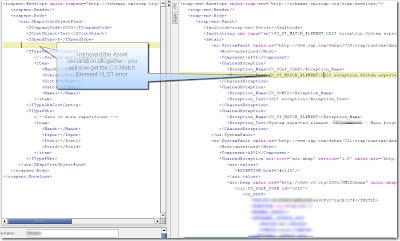
If you receive the following error when calling a BAPI in SAP (e.g. from a .NET WCF client or using SOAPUI):
CX_ST_MATCH_ELEMENT:XSLT exception.System expected element 'MyTableName'
Then you have not initialized your variables correctly. In SOAPUI (http://www.soapui.org/), you cannot remove the elements even though instances are marked as "Zero or many". Instead, you have to pad it with empty elements. You cannot have zero elements in the table (even though the XSD seemingly permits it) otherwise the SAP Web service will spit the dummy.
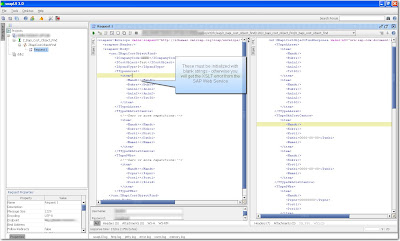
By the same token, you must initialize all your arrays/lists in .NET:
e.g.
CX_ST_MATCH_ELEMENT:XSLT exception.System expected element 'MyTableName'
Then you have not initialized your variables correctly. In SOAPUI (http://www.soapui.org/), you cannot remove the elements even though instances are marked as "Zero or many". Instead, you have to pad it with empty elements. You cannot have zero elements in the table (even though the XSD seemingly permits it) otherwise the SAP Web service will spit the dummy.


By the same token, you must initialize all your arrays/lists in .NET:
e.g.
   try
            {
                CostObjectSearchService.Z_Bapi_Cost_Object_FindClient client = new CostObjectSearchService.Z_Bapi_Cost_Object_FindClient();
                CostObjectSearchService.ZBapiCostObjectFind request = new CostObjectSearchService.ZBapiCostObjectFind();

                request.ICompanyCode = "2000";
                request.ISpendType = "P";
                request.ICostObject = costObjectMatchString;

                //Return Object initialization (for Asset, Cost Centre or Work Breakdown Structure (WBS)
                // - otherwise returns error from SAP Web Service
                // XSLT CX_ST_MATCH_ELEMENT:XSLT exception.System expected element 'MyTableName'
                request.TTypeAAsset = new CostObjectSearchService.Zfanla[0];
                request.TTypeOkhCostCentre = new CostObjectSearchService.Zfcsks[0];
                request.TTypePWbs = new CostObjectSearchService.Zfprps[0];
                CostObjectSearchService.ZBapiCostObjectFindResponse response = client.ZBapiCostObjectFind(request);
Wednesday, 16 December 2009
SAP ABAP and Case sensitivity of the LIKE clause Versus the CS (Contains String) Keyword
I had an issue today with a custom BAPI (using SAP's proprietary language ABAP) that would just NOT return values that I knew were in the PRPS.POST1 field. It turned out that it was a case sensitivity problem - as the LIKE clause in SAP is case sensitive. Typically users don't care about case at all and expect that a search for "Test" will return all upper case and lower case variations (e.g. Test, TEst, TEST, etc).
Unfortunately there is no equivalent of the UPPER() statement in standard SQL Syntax. There are 2 workarounds that I'm aware of:
Sample Search BAPI Code (ABAP)
Additional Notes
2) All statements should end with a period. (ie similar to the use of the semicolon as a line delimiter in C#)
Unfortunately there is no equivalent of the UPPER() statement in standard SQL Syntax. There are 2 workarounds that I'm aware of:
- If you are lucky, there is a field with the same name defined for text fields which has all upper case characters and suffixed with "U". For example, the upper case equivalent of POST1 is the POSTU field. You can then do case insensitive searches on the field by forcing your input parameter to upper case.
- Use the CS (Contains String) Function instead of the LIKE clause within your select.....endselect
See below for details of a real-world example of how to use the CS clause for case-insensitive searches:
The below custom BAPI function accepts a spend type (e.g. Capital Expenditure (CAPEX), Operational Expenditure (OPEX)) company code parameter and a wildcard search field and then populates different objects based on the spend type. For example, a Spend type of OPEX will return a list of Cost Centres into the T_TYPE_OKH_COST_CENTRE Table as an output, a spend type of Asset will return a list of assets into the the T_TYPE_A_ASSET structure in the output.Sample Search BAPI Code (ABAP)
FUNCTION Z_BAPI_COST_OBJECT_FIND.
*"----------------------------------------------------------------------
*"*"Local Interface:
*" IMPORTING
*" VALUE(I_SPEND_TYPE) TYPE EKPO-KNTTP
*" VALUE(I_COMPANY_CODE) TYPE PRPS-PBUKR
*" VALUE(I_COST_OBJECT) TYPE CHAR_50
*" TABLES
*" T_TYPE_P_WBS STRUCTURE ZFPRPS
*" T_TYPE_OKH_COST_CENTRE STRUCTURE ZFCSKS
*" T_TYPE_A_ASSET STRUCTURE ZFANLA
*" EXCEPTIONS
*" EXCEPTION
*"----------------------------------------------------------------------

tables: prps, csks, anla.
data: projdesc(50) TYPE C.

*The below statements use a CS statement rather than the like clause of SQL
*because LIKE is case sensitive in SAP - unfortunately there is no equivalent
* of UPPER() same as in Native SQL Server.

* Get Cost Object of type WBS
* and POSKI LIKE I_COST_OBJECT."
* We need to do a cast
if I_SPEND_TYPE = 'P'.
select * from PRPS
where BELKZ = 'X'
and PBUKR = I_COMPANY_CODE.
* and ( POSID LIKE I_COST_OBJECT or POST1 LIKE I_COST_OBJECT ).
move PRPS-POST1 to projdesc.

if PRPS-TADAT IS INITIAL and
( PRPS-POSID CS I_COST_OBJECT
or projdesc CS I_COST_OBJECT ).
move PRPS-PSPNR to T_TYPE_P_WBS-PSPNR.
move PRPS-POSID to T_TYPE_P_WBS-POSID.
move PRPS-POST1 to T_TYPE_P_WBS-POST1.
append T_TYPE_P_WBS.
endif.
endselect.

* Get Cost Object of type Cost Centre for Retail, Office and Industrial
elseif I_SPEND_TYPE = 'O'.
select * from CSKS
where BUKRS = I_COMPANY_CODE
and ( ABTEI = 'RETAIL'
or ABTEI = 'OFFICE'
or ABTEI = 'INDUSTRIAL'
or ABTEI = '12' ).

if CSKS-NAME1 CS I_COST_OBJECT
or CSKS-KOSTL CS I_COST_OBJECT.

move CSKS-KOKRS to T_TYPE_OKH_COST_CENTRE-KOKRS.
move CSKS-KOSTL to T_TYPE_OKH_COST_CENTRE-KOSTL.
move CSKS-DATBI to T_TYPE_OKH_COST_CENTRE-DATBI.

append T_TYPE_OKH_COST_CENTRE.
endif.

endselect.

* Get Cost Object of type Cost Centre for Marketing
elseif I_SPEND_TYPE = 'K'.
select * from CSKS
where BUKRS = I_COMPANY_CODE
* and ABTEI = 'MARKETING'.
and ABTEI = '12'.

*Conditionally
if CSKS-NAME1 CS I_COST_OBJECT
or CSKS-KOSTL CS I_COST_OBJECT.
move CSKS-KOKRS to T_TYPE_OKH_COST_CENTRE-KOKRS.
move CSKS-KOSTL to T_TYPE_OKH_COST_CENTRE-KOSTL.
move CSKS-DATBI to T_TYPE_OKH_COST_CENTRE-DATBI.
append T_TYPE_OKH_COST_CENTRE.
endif.
endselect.

* Get Cost Object of type Cost Centre for Head Office
elseif I_SPEND_TYPE = 'H'.
select * from CSKS
where BUKRS = I_COMPANY_CODE
and ( ABTEI = 'CORPORATE'
or ABTEI = '12' ).

move CSKS-KOKRS to T_TYPE_OKH_COST_CENTRE-KOKRS.
move CSKS-KOSTL to T_TYPE_OKH_COST_CENTRE-KOSTL.
move CSKS-DATBI to T_TYPE_OKH_COST_CENTRE-DATBI.

append T_TYPE_OKH_COST_CENTRE.

endselect.

* Get Cost Object of type Asset
elseif I_SPEND_TYPE = 'A'.
select * from ANLA
where BUKRS = I_COMPANY_CODE
and ( ANLKL = '13000000'
or ANLKL = '14000000' ).

if ANLA-ANLN1 CS I_COST_OBJECT or
ANLA-TXT50 CS I_COST_OBJECT.
move ANLA-BUKRS to T_TYPE_A_ASSET-BUKRS.
move ANLA-ANLN1 to T_TYPE_A_ASSET-ANLN1.
move ANLA-ANLN2 to T_TYPE_A_ASSET-ANLN2.

append T_TYPE_A_ASSET.
endif.
endselect.

endif.

ENDFUNCTION.
Additional Notes
1) Spaces DO matter around parentheses - the following will NOT work:
INCORRECT:
select * from PRPS
where BELKZ = 'X'
and PBUKR = I_COMPANY_CODE
and (POSKI LIKE I_COST_OBJECT or POST1 = I_COST_OBJECT).
endselect.
CORRECT:
The following is correct syntax
select * from PRPS
where BELKZ = 'X'
and PBUKR = I_COMPANY_CODE
and ( POSKI LIKE I_COST_OBJECT or POST1 = I_COST_OBJECT ).
endselect.
2) All statements should end with a period. (ie similar to the use of the semicolon as a line delimiter in C#)
Wednesday, 2 December 2009
"The service implementation selected is invalid." when attempting to create a web service in SAP Netweaver Developer Studio
I'm currently trying to get the SAP universal worklist APIs to provide information to SharePoint via a web service (to ensure there is only a single task list for users to see). To this end, I needed to create a web service hosted on the SAP BPM server.
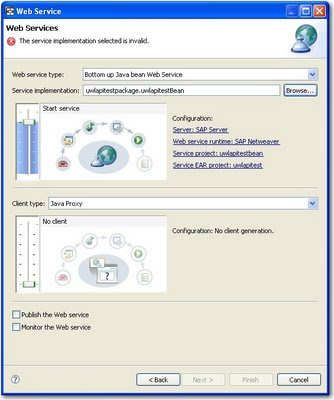
When attempting to create a Java Web service (e.g. a bottom up service, based on a java bean service implementation) in Netweaver Developer Studio (NWDS), you might receive the following cryptic error message:
"The service implementation selected is invalid."
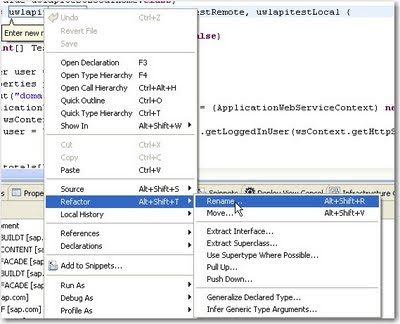
It is as clear as mud - but the issue here is that the class name of the service implementation is lower case. To resolve the issue, just refactor the class with a right click on the offending java file and change the first letter to upper case. Quite painful if you ask me - they really need a better explanation than that in their user interface!
 Fix it with a refactor:
When attempting to create a Java Web service (e.g. a bottom up service, based on a java bean service implementation) in Netweaver Developer Studio (NWDS), you might receive the following cryptic error message:
"The service implementation selected is invalid."
It is as clear as mud - but the issue here is that the class name of the service implementation is lower case. To resolve the issue, just refactor the class with a right click on the offending java file and change the first letter to upper case. Quite painful if you ask me - they really need a better explanation than that in their user interface!
 Fix it with a refactor:
Subscribe to:
Posts (Atom)