If you get a 404 error when using the Search People Web Part, the typical problem is that the part is not pointing to the Search centre correctly.
To fix this, just do the following:
1) Modify Shared Settings on the People Search web part
2) Expand the Miscellaneous section and change the Target search results page URL to /searchcenter/Pages/peopleresults.aspx (Where the /searchcenter portion would be the URL to your search center).
Wednesday, 29 April 2009

Monday, 20 April 2009
Using jQuery to toggle visibility of an ASP.NET textbox based on an ASP.NET DropDownList Control
My requirement was to display/hide associated comments boxes depending on what was entered in a "yes/no/not available" style dropdown.
To implement this, I made use of the following
STEP 1 - Common Code (CommentFieldHelper.js) - add this as a link ref to your masterpage/base page/page/control
STEP 2 - Simple inline in control/page/master page:
STEP 3 - Add controls/divs/spans with the correct class tags so they will be shown/hidden based on the selected value of the dropdown list.
To implement this, I made use of the following
- Hooking up the click and load events of the dropdowns via jQuery so that the comments text boxes would show correctly when the page initially loaded, or when the selected value changed
- Putting spans around groups of controls that I wanted to hide/show to use in the jQuery selectors e.g. span with class of "pricing" for all controls that should be hidden/ shown based on the Pricing dropdown list.
- In the common javascript handler, passing through the dropdownlist control itself, along with the class which should be used by the jQuery selectors to be hidden/shown.
STEP 1 - Common Code (CommentFieldHelper.js) - add this as a link ref to your masterpage/base page/page/control
/********************************************************************************************/
/*Javascript file for hide/show of Yes/No/NA controls and their asssociated comment fields*/
/* Version 0.1 - Original*/
/*******************************************************************************************/

//Initialise handlers when the control is loaded and on change to show/hide associated comment field
function initCommentFieldVisibilityHandlers(sourceControl, classToHide, areNotesShownWhenNo)
{
   //Hook up change handler
   sourceControl.change(
           function() {
   changeCommentFieldVisibility($(this), classToHide, areNotesShownWhenNo);
           }
           )

   //Hook up load handler
   changeCommentFieldVisibility(sourceControl, classToHide, areNotesShownWhenNo)
}


//Set visibility of controls with the "classToHide" class defined on them (typically span class="myclassname")
function changeCommentFieldVisibility(sourceControl, classToHide, areNotesShownWhenNo) {

   //debugger;
   var selected = $('option:selected', sourceControl).text();

   if (areNotesShownWhenNo == false) {
       if (selected == 'No') {
           $('span.' + classToHide).fadeOut();
       }
       else {
           $('span.' + classToHide).fadeIn();
       }
   }
   else {
       ///If areNotesShownWhenNo and selected item is not No, then hide.
       if (selected != 'No') {
           $('span.' + classToHide).fadeOut();
       }
       else {
           $('span.' + classToHide).fadeIn();
       }

   }
}
STEP 2 - Simple inline in control/page/master page:
<script language="javascript" type="text/javascript">

//Place in your user control/page/masterpage
$(document).ready(function() {
//Initialise hide and show of associated comments textbox onload/onchange of dropdown list
initCommentFieldVisibilityHandlers(
  $('#<%=ProposalAssessmentFormView.FindControl("FundingStateInfrastructureRelevantDropDownList").ClientID %>'),
  'fundingStateInfrastructureRelevant', false);

})

</script>
STEP 3 - Add controls/divs/spans with the correct class tags so they will be shown/hidden based on the selected value of the dropdown list.
Wednesday, 15 April 2009
Warning: Declarative workflows created in SharePoint Designer 2007 will silently fail with MOSS SP1
If you have installed SP1 of WSS 3.0 or MOSS 2007, declarative workflows will not start if you log in as the system account. The fix is here:
http://kbalertz.com/947284/declarative-workflow-start-automatically-after-install-Windows-SharePoint-Services-Service.aspx
I would at least hope for an entry in the Event Log or SharePoint Hive log files rather than a silent failure in this case!
http://kbalertz.com/947284/declarative-workflow-start-automatically-after-install-Windows-SharePoint-Services-Service.aspx
I would at least hope for an entry in the Event Log or SharePoint Hive log files rather than a silent failure in this case!
How to Add Properties and Custom Columns to Advanced Search in MOSS 2007
One of the reasons for adding metadata (apart from supporting grouping and filtering within lists) is to enhance your search experience. However, if you cannot specify that you want to search by a particular field e.g. "Faculty", then the quality of your search results and your ability to refine searches will be dramatically reduced.
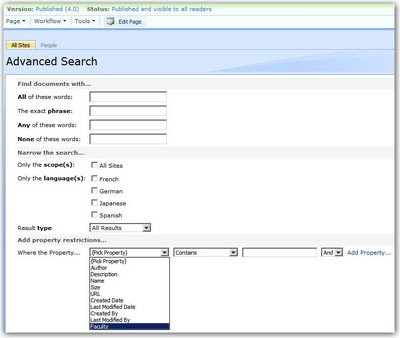
To Add a custom field to the Advanced Search, you have to do the following:

To Add a custom field to the Advanced Search, you have to do the following:
- Go to the Advanced Search page of the Search Center itself and switch the page to edit mode
- When in Edit mode, Modify the Advanced Search web Part
- Expand the "Properties Node" in the Advanced Search Web Part
- Add an element to the PropertyDefs element with your field:
- Before this entry will appear in the drop-down menu in the Advanced Search Web Part, you’ll also have to add a PropertyRef element as a child to the ResultType element.

For more detail on how Search works for custom fields, see http://msdn.microsoft.com/en-us/library/bb608302.aspx
Tuesday, 7 April 2009
SharePoint Designer 2007 Now Free! - No April Fools
Microsoft Office 2007 SharePoint Designer is a must-have tool for any SharePoint Developer. In a March 30 2009 Letter to customers, the Microsoft Office team has announced the move to make it completely free:
http://office.microsoft.com/en-us/sharepointdesigner/HA103607611033.aspx
I originally thought the announcement may have been an April fools joke - but that is not the case... so download it and enjoy.
You can download it from here:
http://www.microsoft.com/downloads/details.aspx?displaylang=en&FamilyID=baa3ad86-bfc1-4bd4-9812-d9e710d44f42

What I'm really hanging out for is when the generous guys at Microsoft could make the other Office 2007 products free too... :o)
We can live in hope.
http://office.microsoft.com/en-us/sharepointdesigner/HA103607611033.aspx
I originally thought the announcement may have been an April fools joke - but that is not the case... so download it and enjoy.
You can download it from here:
http://www.microsoft.com/downloads/details.aspx?displaylang=en&FamilyID=baa3ad86-bfc1-4bd4-9812-d9e710d44f42
What I'm really hanging out for is when the generous guys at Microsoft could make the other Office 2007 products free too... :o)
We can live in hope.
Friday, 3 April 2009
LinqDatasource not updating when Update Button is clicked in ASP.NET ListView
If you are using a LINQDatasource (or any ASP.NET datasource controls with 2 way databinding) and some of your fields are not updating, then one of the first things you should check is that you are not using Eval, rather than Bind() on your templated fields.
Today, one of my colleagues had issues with both inserting and updating records using a ListView and a LINQ datasource. After a little bit of DK (Divide and Konquer), I eventually found something he had (painfully) overlooked - the Item Template values used Eval (which is fine). However, he had updated the Item template and copied it over to the Edit Item templates and Insert Item templates to save time.
Obviously, Evals are readonly - so the values were never passed into the update of the LINQ datasource.
Today, one of my colleagues had issues with both inserting and updating records using a ListView and a LINQ datasource. After a little bit of DK (Divide and Konquer), I eventually found something he had (painfully) overlooked - the Item Template values used Eval (which is fine). However, he had updated the Item template and copied it over to the Edit Item templates and Insert Item templates to save time.
Obviously, Evals are readonly - so the values were never passed into the update of the LINQ datasource.
Tuesday, 31 March 2009
Rendering Different Colors for each row in an ASP.NET Gridview
This is simple as handling the MyGridViewName_RowDataBound event. The following code sample is used in the following scenario:
NB. An alternative (and preferred) to using relection to get the nested property is using LINQ projection - which is how I did it when I checked the code into source. control. However, the code sample above still illustrates the topic of this post.
- The grid is bound to a LINQDataSource (the e.Row.DataItem has a type of "DynamicClass" and so cannot be cast directly)
- Consequently uses reflection to get a nested property inside the e.Row.DataItem, then casts that to a known LINQ2SQL class.
- From this reflected information, grabs the display colour HEX value (e.g. #CCFFCC and converts it to a System.Drawing.Color colour (by using System.Drawing.ColorTranslator).
        protected void proposalListGridView_RowDataBound(object sender, GridViewRowEventArgs e)
        {
            if (e.Row.RowType == DataControlRowType.DataRow)
            {
                DoPBusiness.PlanningProposalTracking.PP_LIST_Status status =
                    (DoPBusiness.PlanningProposalTracking.PP_LIST_Status)
                    e.Row.DataItem.GetType()
                    .GetProperty("PP_LIST_Status")
                    .GetValue(e.Row.DataItem, null);

                e.Row.BackColor = System.Drawing.ColorTranslator.FromHtml(status.DisplayColour);
            }
        }
NB. An alternative (and preferred) to using relection to get the nested property is using LINQ projection - which is how I did it when I checked the code into source. control. However, the code sample above still illustrates the topic of this post.
Thursday, 19 March 2009
SharePoint 2007 - Backup and Restore via stsadm.exe and a Warning About Using the -o setsitelock Flag
For a presentation to a client the other day, I used my "swiss army knife" VMWare image with SharePoint 2007 on it. However, I quickly needed to move a site collection from my MOSS instance to a new machine. There are several options to do this, including:
This problem occurrs because the backup process doesn't reset the readonly flag for you (which is fair enough). If you follow the steps exactly, you will have the same issue. What mainly concerns me is that I would expect a user to be able to log in at least - just not to manipulate the site at all - not to be denied completely. In summary, it would appear that there is no real difference between -lock readonly and -lock noaccess when setting a lock on a site. When the site is readonly, you simply cannot log in at all.
So the fix after restoring the site to the other machine (and my original VM image) was simply to set the readonly flag to none via "stsadm -o setsitelock -url
After doing this, I also had to reboot for me to be able to log in to the site.
- Doing a SQL DB backup
- Using SharePoint Designer 2007 (which I occasionally use as it offers the most granular backup and restore options.
- Using stsadm restore functionality.
- As per the link below, the site should be made read only otherwise the backup may be corrupted (due to partial or incomplete writes to the content databases) . I normally just do a backup with stsadm without locking it first and it has never been an issue. Just to make sure, I followed the step by step instructions as per http://technet.microsoft.com/en-us/library/cc706871.aspx. One of the steps used: "stsadm -o setsitelock -url
-lock readonly". The backup appeared to complete successfully (as I've done many times before). - Problem was that when my Oakton colleague Paul Rowland moved the site collection over to another virtual machine image (on MS Virtual PC) and tried to restore it, it was impossible to log in. Originally I thought the problem was due to the domain settings being different - but he couldn't log in even after changing the site collection administrator. The account was definitely not locked out and the password was correct as he had logged into and out of the machine with those same Administrator credentials.
- I tried to log back into my original machine (where I made the backup) and I couldn't log into it at all - even Administrator gave "Access denied" on the site.
This problem occurrs because the backup process doesn't reset the readonly flag for you (which is fair enough). If you follow the steps exactly, you will have the same issue. What mainly concerns me is that I would expect a user to be able to log in at least - just not to manipulate the site at all - not to be denied completely. In summary, it would appear that there is no real difference between -lock readonly and -lock noaccess when setting a lock on a site. When the site is readonly, you simply cannot log in at all.
So the fix after restoring the site to the other machine (and my original VM image) was simply to set the readonly flag to none via "stsadm -o setsitelock -url
After doing this, I also had to reboot for me to be able to log in to the site.
Subscribe to:
Posts (Atom)